Features
One key. Everywhere. Nothing leaves your PC.
Most dictation tools ask you to change how you work — open their window, dictate into their box, copy the result out. InkBeepAI removes that entirely: it types into whatever already has your cursor, and it never touches the network to do it.
The gesture
Press a key. Speak. Press again. The text appears at your cursor. That is the entire interface, and it is deliberately the entire interface.
Works in the apps you already use
Browsers, Gmail, Word, Outlook, Slack, Notion, terminals, code editors, form fields, search boxes. InkBeepAI sends real text to whatever has focus, so there is no per-app integration to wait for. Windows running as administrator, such as Task Manager, are out of reach; and the occasional application that ignores a Ctrl+V paste takes the typing option in Settings instead.
No window, no focus steal
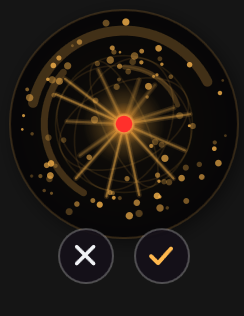
The overlay is a small orb that cannot take focus. It carries a tick and an X while it listens, so you can finish or cancel with the mouse if your hands are already there — but the hotkey and Esc do the same thing and neither is ever required. Your cursor stays exactly where it was, your text selection survives, and nothing you were doing is interrupted.
Toggle or hold-to-talk
Toggle is the default: press the hotkey once to start, speak, and press it again to insert. Nothing is held down. Prefer holding the key and releasing to insert? That is the other option in the same dropdown.
Remappable hotkey
Ctrl+Win by default. Change it to a key you actually have free — Right Alt is a popular choice.
Esc cancels
Changed your mind mid-sentence? Esc drops the recording and anything still transcribing. Nothing is inserted.
Starts with Windows
Lives in the tray, ready from login. There is no app to launch before you can talk.
Speed you do not wait for
Release the key and the sentence lands pretty quickly. No spinner, no upload, no round trip, no rate limit, no queue behind other users. The model for your language is already loaded in memory on your machine before you start speaking.
How fast depends on your PC and on your language. English is quick on the processor alone. Other languages need a graphics processor to be usable for dictation; if your PC cannot keep up, InkBeepAI tells you and offers to switch to English. What doesn't change is that nothing is uploaded and nothing waits in a queue.
Because there is no server, the speed does not change when your connection is bad, when you are on hotel Wi-Fi, or when a provider is having a busy afternoon.
The details that decide whether you keep using it
Dictation tools are usually abandoned over small friction, not big failures. These are the ones that mattered enough to build:
- Your clipboard survives. InkBeepAI inserts text via the clipboard and then puts back the text, formatting, images or files you had copied before, so dictating rarely costs you the thing you were about to paste. Formats that belong to one application, such as copied Excel cells, come back as their text and formatting only — and if the clipboard held nothing but such a format, your transcript is left on it instead.
- Transcripts stay out of Clipboard History. Windows keeps the last 25 clipboard entries and, with sync switched on, uploads them to your Microsoft account. InkBeepAI explicitly tags its payload so Windows excludes it from both. Without that, every privacy claim on this site would be false by a side door.
- Chained dictation does not lose sentences. Release and immediately press again and both transcripts land, in order. Insertion waits for the new recording rather than racing the key you are physically holding.
- Punctuation and capitalisation are handled so the output reads like writing, not a transcript.
- It tells you when your microphone is too quiet — while you are still speaking, not after you have dictated a paragraph into a mic that could never have picked it up.
- It checks your processor before it fails. Unsupported CPU? You are told at startup, in plain language, instead of hitting a cryptic error later.
Make it yours
The defaults are chosen so that most people never open the settings. Everything below is there for the people who do.
Say it short, type it long
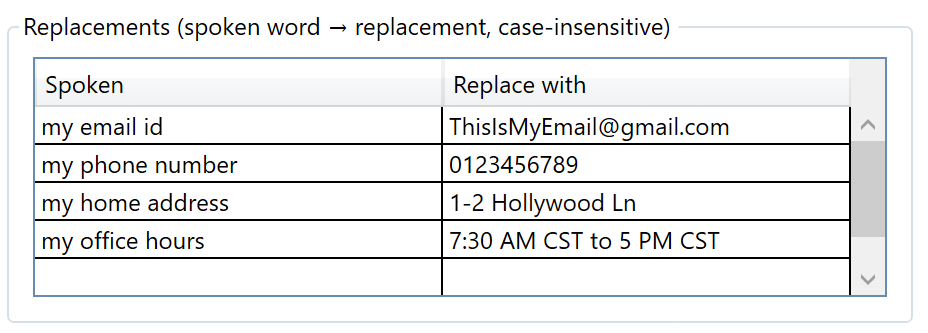
Teach InkBeepAI that “my email id” means your actual address, or that “my office hours” means the whole sentence. You speak three words and the finished text lands. It is the difference between dictating an address and dictating a phrase.
The table lives on your machine, the substitution happens on your machine, and the phrase you spoke never leaves it — so the things most worth expanding, the ones you would never paste into a cloud tool, are exactly the ones this is safe for.
The dials, if you want them
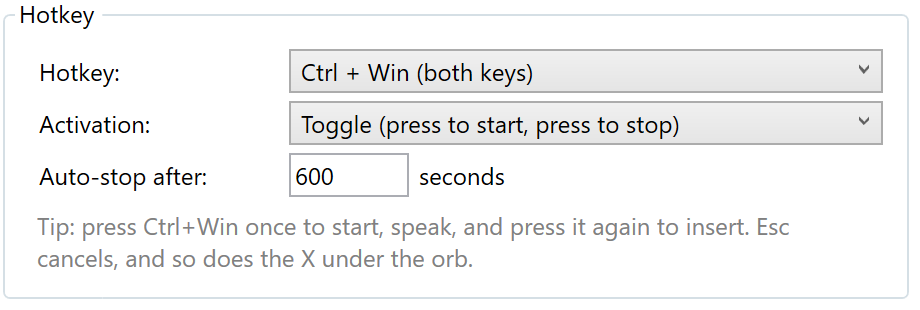
- Pick the hotkey, and pick how it behaves — press once to start and again to stop, or hold to talk to start and again to stop.
- Auto-stop after a set number of seconds, so a key you did not realise you were holding cannot leave the microphone open.
- Choose the microphone, rather than accepting whatever Windows last decided was the default.
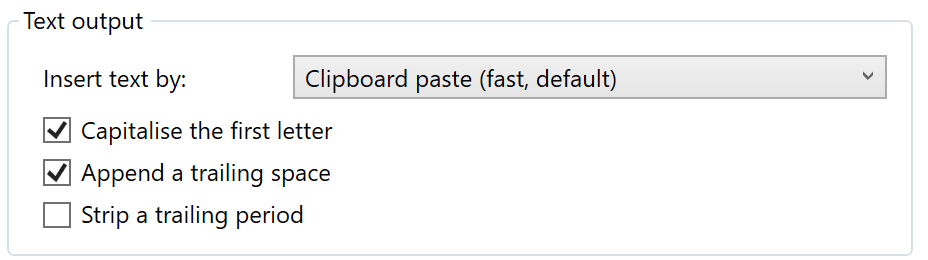
- Paste or type the text. Pasting is faster and is the default; typing is the escape hatch for the occasional application that refuses a paste.
- Capitalise the first letter, append a trailing space, strip a trailing period — three small switches that decide whether the output drops into your writing or has to be tidied up afterwards.
- Start with Windows, and sounds on or off for the start and end of recording.
Privacy that is checkable, not asserted
Speech recognition runs on your own PC. Both speech models — one for English, a larger one for every other language — ship inside the download, and nothing is fetched at runtime, ever.
- Audio is captured, transcribed and discarded in memory. Never written to disk, so there is no cache, temp file or recording to recover.
- Logs record timings and character counts. Never the text.
- No account. No sign-in. No profile. You paste a licence key once.
- The app talks to one server, ours: once when you activate your key, then a licence check every two weeks. Each request carries your key and up to three anonymous hardware hashes — never audio, never text.
The test: disconnect from the internet completely and keep dictating. Nothing changes. Full explanation, and how to verify it yourself →
Yours, permanently
One-time purchase
A perpetual licence for the version you bought — no subscription, no renewal, no expiry date. Future major versions may be a separate purchase; this one stays yours regardless. What that covers exactly.
Licences verify offline
Your licence is checked against a cryptographic signature held on your own machine. The server is only needed to activate a new machine.
Designed to outlive us
If our servers vanish, your app keeps working. It is built so that silence from the licence server never blocks a paying customer — that is a deliberate design rule, not a happy accident.
Move it to a new PC free
Replaced your laptop? We free the old slot. Reinstalling on the same machine costs nothing and uses no slot at all.
Buy for one device or a hundred
Licences cover . The same app at every tier — the only difference is how many machines one key activates. See the ladder.
30-day refund
No questions asked. If it is not what you wanted, say so and the money goes back.
What it does not do
Stated here rather than discovered after you pay:
- Only 16 languages are verified. InkBeepAI dictates in 99, one at a time, chosen by you — but 83 of those are not verified, and the app says so when you pick one. The table, the method, and the 9 that missed our bar on native speakers.
- No voice commands. It types what you say; it does not drive your applications or edit by voice.
- No custom vocabulary, so unusual proper nouns and specialist jargon may need correcting.
- It cannot transcribe recorded audio files — live speech only.
- It cannot type into windows running as administrator (Task Manager, elevated PowerShell). Windows blocks that for every tool that does not demand admin rights, which is a protection, not a defect.
- Windows only.
- Needs a processor with AVX2 — Intel Core 4th generation (2013) or newer, AMD Ryzen / FX "Excavator" (2015) or newer.
- Languages other than English need a graphics processor to be usable for dictation; English does not. If your PC cannot keep up in the language you picked, InkBeepAI tells you and offers to switch to English.
If several of those are dealbreakers, a full dictation suite is probably the better purchase — we say so here too.
Common questions
Does it work without an internet connection?
Completely. Speech recognition runs on your own PC and both speech models ship inside the download. InkBeepAI talks to one server, ours: once when you activate your key, then a licence check every two weeks, each carrying your licence key and up to three anonymous hardware hashes — never audio, never text.
Which applications does it work in?
The applications you type into: browsers, Gmail, Word, Outlook, Slack, Notion, terminals, code editors, search boxes and form fields. InkBeepAI inserts real text into whatever window has focus, so there is no per-app support list. Windows running as administrator, such as Task Manager or an elevated PowerShell, are out of reach: Windows blocks every tool without admin rights from typing into them. A few applications ignore a Ctrl+V paste — some terminals among them — and for those, Settings can type the text instead of pasting it.
Will it overwrite my clipboard?
Almost never. InkBeepAI inserts text via the clipboard and then puts back the text, formatting, images or files you had copied beforehand. Formats that belong to one application, such as copied Excel cells, come back as their text and formatting only, and if the clipboard held nothing but such a format, your transcript is left on it instead. It also tags the transcript so Windows keeps it out of Clipboard History and out of cloud clipboard sync.
How fast is it?
Quick, and — more to the point — consistent. Recognition runs on your own PC, so there is no upload, no queue and no rate limit: it does not slow down on a poor connection or at a busy time of day, and it never waits behind anyone else's request. How quick depends on your PC, on your language and on how much you said in one go. English is quick on the processor alone; other languages need a graphics processor to be usable for dictation, and InkBeepAI tells you if your PC cannot keep up.
Is it a subscription?
No. It is a one-time purchase with a 30-day refund window. Your licence verifies offline, so the app keeps working even if our servers go away.
Can I use one licence on more than one computer?
Yes — how many depends on the tier you buy, from a single device up to a hundred. Every tier is the same app. If you replace a machine, contact support and we free the old slot at no charge.
What languages does it support?
99, offline, with both speech models inside the download. You pick one and it stays picked — it is dictation in your language, never a mixture and never a translation. We measured 25 of them ourselves on recordings of native speakers: 16 passed our bar and carry a published error rate, and 9 missed it and are named with their figures. The other 83 are not verified — they run, and the app says so when you pick one, rather than being counted as a feature. The full table and how it was tested.
Talk instead of typing
One-time purchase, 30-day refund, no subscription, no account.